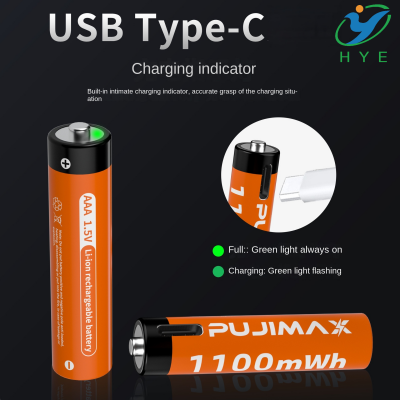
Does using USB-C harm the battery
The arrival of USB-C has revolutionized the world of charging, offering faster data transfer speeds and the potential for higher power delivery compared to traditional USB-A connections. However, as the use of USB-C charging devices grows, so does the question: Does USB-C damage battery life or performance?
In short, USB-C does not damage your battery if used correctly. It is, in fact, a safer and more efficient charging method, as long as the charging device, cable, and power adapter are all compatible with the battery's specifications. Let's dive deeper into how USB-C works, whether it can affect battery life, and how you can get the most out of your rechargeable batteries with USB.
Understanding USB-C and Battery Charging
USB-C is a versatile and modern charging standard, designed to provide higher power levels and faster charging times. This has made it the preferred option for charging smartphones, laptops, power banks, and even tools that use rechargeable batteries with USB like Milwaukee USB batteries or Dewalt battery adapter USB.
Unlike older charging methods, which had separate connectors for data and power, USB-C combines both in a single, reversible connection. This means that not only does USB-C enable faster data transfer, but it can also support higher power delivery (PD) for charging devices more quickly.
But here's the real question: does this higher power delivery damage your device's battery? The answer depends on a few key factors:
Does USB-C Damage Batteries?
USB-C itself doesn't damage batteries, but how you use it can. The charging speed and efficiency provided by USB-C can indeed benefit your devices, but improper usage or incompatible charging setups may cause issues. Here’s what you need to know:
-
Battery Management Systems (BMS): Modern batteries, particularly lithium-ion ones, like 18650 rechargeable batteries, come equipped with sophisticated Battery Management Systems (BMS). These systems regulate charging to prevent overcharging, overheating, and overvoltage, ensuring your battery’s safety. As long as your USB battery charger and USB-C portable battery charger are built with proper charging protocols, your battery should be safe.
-
Correct Charging Voltage: USB-C allows for fast charging, but the speed is determined by the device’s compatibility with USB Power Delivery (PD) standards. If you use a charger that supports USB-C PD, your battery will only draw the appropriate amount of power, ensuring it is charged safely. Overcharging is prevented by the BMS in most modern batteries, so USB-C charging won’t cause damage if done correctly.
-
Temperature Regulation: One of the risks of fast charging is the generation of heat. Excessive heat can degrade battery life over time. However, USB-C portable battery chargers are designed to dissipate heat efficiently, and most high-quality chargers (like those from Dewalt or Milwaukee) will include temperature monitoring to prevent overheating.
-
Quality of Charging Equipment: The key to preventing damage is using high-quality charging equipment. Low-quality chargers or incompatible cables may not provide proper voltage or current, leading to inefficiencies or even damage. It's crucial to use a certified USB charger battery or battery USB charger designed specifically for your device.
How Does USB-C Compare to Other Charging Standards?
Before we get into how to avoid damaging your battery, it's essential to understand how USB-C compares to older charging methods:
-
USB-A vs USB-C: While USB-A has been around for a long time, it only supports lower power levels and slower data transfer rates. USB-C, on the other hand, can deliver up to 100 watts of power, significantly faster than USB-A. When it comes to charging rechargeable batteries with USB, USB-C offers a better and more efficient solution.
-
USB-C PD (Power Delivery): With USB-C PD, the power delivered to the device is intelligently negotiated between the charger and the device. This dynamic adjustment allows devices to draw only as much power as they need, preventing overcharging or excessive heat buildup. In comparison, older charging standards did not have this capability, which sometimes led to overcharging or overheating.
The Role of the Battery Management System (BMS)
As mentioned earlier, modern rechargeable batteries (such as 18650 rechargeable batteries) are equipped with a Battery Management System (BMS), which plays a crucial role in regulating how a battery charges. The BMS ensures that the USB charger battery does not charge a battery beyond its capacity, preventing overcharging, overvoltage, or excessive current that could potentially damage the battery.
The BMS also prevents issues related to temperature. If a battery gets too hot during charging, the BMS will reduce or cut off the power to protect the battery from overheating.
Charging Tools and Compatibility
When you choose to charge your 18650 rechargeable batteries or any device that uses a USB battery charger, ensure that the charging equipment is compatible with your battery’s voltage and current requirements. Using tools like Dewalt battery adapter USB or Milwaukee USB battery chargers designed for these purposes is a safe bet, as they are built to handle high power and provide smart charging.
If you are using an adapter, make sure it is specifically designed to work with your battery type. For example, charging a USB to battery pack adapter that isn’t compatible could result in inefficient charging or, in the worst-case scenario, damage the battery.
Best Practices for Charging with USB-C
To keep your battery safe when using USB-C, follow these best practices:
-
Use Quality Chargers: Always use high-quality, certified USB battery chargers that are specifically designed for your battery type.
-
Monitor Temperature: Avoid charging your battery in environments with excessive heat. Heat can reduce the lifespan of your battery, even when using USB-C.
-
Avoid Overcharging: Make sure your charger is compatible with USB Power Delivery (PD) standards, so your battery receives only the necessary power.
-
Use the Right Cables: Using cheap or incompatible USB-C cables can lead to inefficiencies or, worse, battery damage. Always use certified cables from reputable manufacturers.
Conclusion
So, does USB-C damage batteries? The answer is no—USB-C itself does not damage your battery if you use the right equipment and follow best practices for charging. By selecting compatible, high-quality chargers, such as USB battery chargers or USB-C portable battery chargers, and using certified cables, you can ensure that your battery stays safe while charging.
As long as you prioritize using high-quality USB chargers, properly managing charging speeds, and paying attention to temperature, USB-C can be a fantastic solution for fast, efficient, and safe battery charging. Whether you're charging Milwaukee USB batteries, Dewalt battery adapters, or your standard rechargeable batteries with USB, you can rest easy knowing your battery is in good hands.
Does USB tethering drain or damage your battery
can 18650 batteries be charged via USB